
 EdCircuit Staff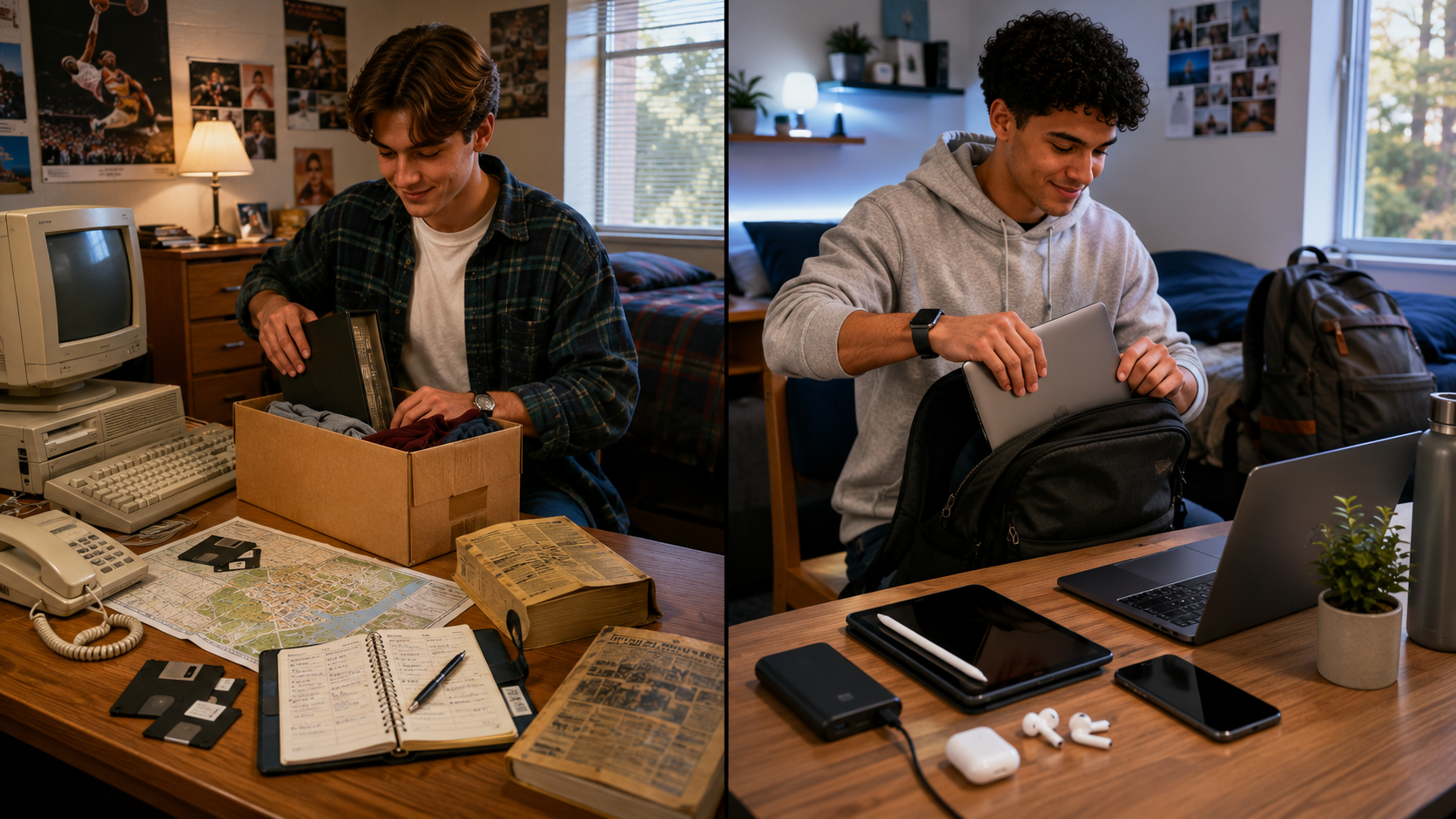
College technology prep in 2026 looks almost nothing like the preparations many parents made before leaving for college in the 1990s.
A parent may remember packing a word processor or bulky desktop computer, a telephone calling card, rolls of quarters for laundry, a paper planner, and a printed campus phone book containing nearly every student’s telephone number and residence hall address. Finding a classroom meant unfolding a campus map. Meeting someone for dinner meant agreeing on a time and place in advance. Calling home often meant using the telephone attached to the dorm-room wall—and hoping a roommate was not already using it.
Today’s freshman may leave for college carrying a laptop, tablet, smartphone, smartwatch, wireless earbuds, portable battery, cloud-storage accounts, digital textbooks, campus authentication apps, and access to artificial intelligence platforms that can explain a calculus problem, review a paper, summarize a reading, build a study guide, or help debug computer code.
The campus phone book has been replaced by a group chat. The paper map has become live navigation. The word processor has become an AI-assisted workspace. The dorm-room telephone has become a device that can unlock buildings, pay for lunch, receive emergency alerts, attend a virtual office hour, and submit an assignment before the student has even climbed out of bed.
Students have never arrived on campus with more technology at their disposal.
That does not mean they have never been better prepared.
The central question for families is no longer simply, “What computer should we buy?” It is, “Does this student know how to build a dependable, secure, and academically responsible technology system?”
Imagine the First Week of College
Consider what a freshman may encounter within the first few days.
The student receives a residence hall announcement through one app, a class assignment through the learning management system, an authentication request through another app, and an invitation to a study group through GroupMe or another messaging platform. The dining plan is connected to a digital campus card. A professor posts a room change online. The university sends a severe-weather notification by text. An introductory course requires an online homework platform that the student has never used.
One professor encourages students to use artificial intelligence to generate practice questions. Another requires students to disclose every use of AI. A third prohibits generative AI on graded assignments.
Meanwhile, the student’s family assumes everything is going well because there has been no urgent phone call home.
This is the new college transition.
Technology is no longer a separate component of the college experience. It is part of the infrastructure through which students register for courses, communicate with professors, access financial aid, receive grades, schedule advising appointments, complete assignments, find transportation, enter buildings, and participate in campus life.
EDUCAUSE’s research on students and technology reflects the growing connection among generative AI, technology services, accessibility, academic experiences, mental health, and preparation for the workforce. The quality of a student’s technology experience can directly affect the student’s ability to participate, remain organized, and access support.
A prepared freshman does not need to master every platform before arriving. However, the student should understand that college technology is now an ecosystem. When one part of that ecosystem breaks down—a forgotten password, missed notification, incompatible device, lost file, or compromised account—the consequences can quickly become academic, financial, and personal.
Check the College Before Buying the Technology
The biggest technology mistake families can make is buying first and researching later.
Before purchasing a laptop, tablet, software package, or expensive subscription, families should review the technology requirements published by the college and the student’s intended academic department. Engineering, architecture, media production, graphic design, nursing, data science, business, and computer science programs may require software that will not operate effectively on every device.
A Chromebook may be perfectly adequate for one student and completely unsuitable for another. A tablet can be an outstanding note-taking companion without being a full replacement for a laptop. A high-performance computer may be necessary for video editing, design, advanced mathematics, simulation, or coding—but excessive for a student whose primary needs are research, writing, email, and presentations.
For many freshmen, a reliable laptop with a solid-state drive, a dependable battery, an updated operating system, a functioning camera and microphone, and at least 16 GB of memory will provide a practical foundation. The best device is not automatically the most expensive one. It is the device that can run the student’s required programs, survive frequent travel across campus, and remain dependable for several years.
Families should also investigate what the institution already provides. Many colleges include access to Microsoft 365, Google Workspace, cloud storage, cybersecurity software, statistical programs, design tools, virtual computer labs, and specialized academic applications.
Students should activate their college accounts before paying for software. A school email address may also unlock student plans or education pricing from technology companies. Notion, for example, offers an education plan for eligible students using verified institutional email accounts.
The goal is not to send students to campus with every possible device and subscription. It is to give them the correct tools without paying twice for services the college already supplies.
The Smartphone Has Become a Campus Command Center
Parents may still think of a smartphone primarily as a communication and entertainment device. For a college student, it may also function as a campus identification card, transportation pass, room key, payment method, scanner, calendar, authentication device, safety alert system, camera, and connection to academic support.
Before move-in day, students should install the college’s official applications and organize them into a clearly labeled campus folder. That folder may include the institution’s main app, student email, learning management system, authentication tool, library app, dining platform, transportation service, emergency notification system, and residence hall app.
Students should also make thoughtful decisions about notifications.
Turning off every notification may cause them to miss an assignment update, class cancellation, registration deadline, payment notice, or emergency warning. Allowing every app to interrupt them can make sustained reading, writing, and studying nearly impossible.
Digital independence requires more than knowing how to install an app. It requires knowing which information deserves immediate attention and which notifications can wait.
That may be one of the most important technology skills a freshman develops.
AI Will Be Everywhere, but Students Do Not Need Everything
Artificial intelligence may be the defining difference between students beginning college in 2026 and their parents’ college experience.
Freshmen are likely to encounter ChatGPT, Gemini, NotebookLM, Microsoft Copilot, Claude, Perplexity, Grammarly, and a growing collection of AI features built directly into word processors, search engines, learning platforms, and campus systems.
Students do not need paid subscriptions to every AI platform.
They need one or two dependable tools, a clear understanding of what those tools do, and enough judgment to recognize when AI is supporting their learning and when it is beginning to replace it.
ChatGPT can help a student work through unfamiliar material, generate practice questions, receive feedback on an outline, or explore different ways of explaining a concept. Its Study Mode is designed to guide users through questions and explanations rather than simply supplying a final response.
NotebookLM can be especially useful when students upload approved course materials such as lecture slides, notes, readings, and study guides. Because its responses are grounded in the material provided, students can use it to generate summaries, quizzes, study guides, and explanations with citations connected to their source documents.
Microsoft Copilot may become part of a student’s workflow at institutions using Microsoft 365. It can support brainstorming, summarizing, analyzing information, and working within familiar productivity applications, although access and available features will depend on the college’s licensing arrangements.
Claude may be useful for working through lengthy readings, developing practice questions, improving explanations, reviewing writing, or supporting coding tasks. Anthropic has created a higher education offering and has reported student uses that include editing, summarizing, technical explanations, mathematics, and programming support.
Perplexity can help students begin exploring a research topic and identify possible sources, while Grammarly can provide writing feedback and help students document AI-assisted work. Both now promote education-focused offerings for students.
However, no AI platform should become a substitute for the college library, a professor’s instructions, assigned readings, original sources, or the student’s own analysis.
A freshman might use NotebookLM to review lecture material, ChatGPT to create practice questions, Copilot to organize a presentation, and Perplexity to identify starting points for research. But the student must still read the material, check the evidence, solve the problem, evaluate the source, and take responsibility for the final submission.
AI can make a student faster without necessarily making the student wiser.
The challenge for higher education is helping students develop both.
Every Syllabus May Have a Different AI Rule
There is no universal AI policy that applies to every college course.
One professor may encourage AI-assisted brainstorming. Another may permit grammar feedback but prohibit generated text. A third may allow AI for practice but not for graded work. A fourth may require students to submit prompts, drafts, citations, or an explanation of how AI contributed to an assignment.
Stanford’s teaching guidance notes that instructors may establish different course-level AI policies and encourages students to seek clarification when expectations are uncertain.
Students should therefore read the AI section of every syllabus rather than assuming that one professor’s policy applies to another course.
When the rules are unclear, students should ask before using the tool—not after an assignment has been questioned.
Freshmen should also learn to keep records of meaningful AI use. Saving prompts, drafts, revisions, source checks, and notes can help a student explain how the work developed. More importantly, that record encourages students to remain active participants in the process.
The question should not be, “Can AI complete this assignment?”
The better question is, “How can I use technology without surrendering the thinking this assignment was designed to develop?”
The Best Note-Taking App Is the One the Student Will Reopen
Families often ask which note-taking app is best. The answer depends less on the number of features and more on how the student learns.
Students who prefer traditional digital notebooks may be comfortable with Microsoft OneNote. It allows courses to be divided into notebooks, sections, and pages and can accommodate typed notes, handwriting, images, files, and annotations.
Students who want one central location for notes, assignments, calendars, club responsibilities, and project planning may prefer Notion. Its flexibility is powerful, but it carries a warning: students should not spend three hours designing a beautiful productivity dashboard to avoid starting a 30-minute assignment.
Students who learn by writing, drawing diagrams, solving equations, or annotating lecture slides may benefit from a tablet and an application such as Goodnotes. The platform is designed to organize handwritten notes, slides, textbooks, and course materials across subjects.
Students in research-intensive majors may prefer Obsidian, which allows them to link related ideas and gradually build a personal knowledge base across courses. Its strength is not simply storing notes but helping students see connections among concepts, readings, people, and projects.
The best system may also change by course. A student might handwrite chemistry equations, type history notes, annotate biology diagrams, and use a project board for a group presentation.
What should not change is where the student looks for the information.
Notes scattered among text messages, screenshots, five apps, three email accounts, loose files, and unnamed cloud folders are not an academic system. They are a digital junk drawer.
Freshmen should choose one primary location for academic notes, one calendar for deadlines, and one consistent naming system for files.
A basic folder titled “English Paper” will eventually become confusing. A file named “ENG101_ResearchDraft_2026-09-18” is far easier to locate three weeks later.
The organization does not feel urgent until the night before something is due.
Learn the Campus Systems Before the First Assignment
The learning management system may become the most important website a freshman uses.
Whether a college relies on Canvas, Blackboard, Brightspace, Moodle, or another platform, students should know how to locate a syllabus, submit an assignment, view feedback, join a discussion, contact an instructor, check grades, and find recorded lectures before classes begin.
They should also learn how deadlines are displayed. A calendar automatically generated by the learning management system can be helpful, but students should not assume it contains every responsibility. Reading assignments, long-term projects, exam preparation, laboratory work, registration dates, job schedules, athletics, club meetings, and personal appointments may need to be added manually.
A freshman’s calendar should become more than a list of due dates. It should show when the work will actually be completed.
An exam entered on Friday is a reminder. Study sessions entered on Monday, Tuesday, and Wednesday represent a plan.
That difference often separates students who feel constantly surprised by college from those who begin to control their time.
Cybersecurity Is Now Part of College Readiness
Students may arrive on campus thinking cybersecurity is primarily the responsibility of the college’s technology department.
It is not.
A compromised student account can expose email, classwork, cloud files, financial information, academic records, saved passwords, and access to campus services. It can also prevent a student from submitting an assignment, registering for classes, or receiving important communication.
Students should activate multifactor authentication immediately, use unique passwords, create a password-manager account, install software updates, enable device tracking, and store account-recovery codes in a secure location. CISA identifies multifactor authentication and strong password practices as essential protections because stolen passwords alone should not be enough to access an account.
Freshmen must also be prepared for scams designed specifically for college students.
A message may appear to come from a professor offering a personal-assistant position. A supposed recruiter may request banking information. A fake employer may send a check and instruct the student to purchase equipment or return part of the money. The Federal Trade Commission continues to warn students about job scams that begin through email, text messages, social media, and online job postings.
Students should never approve an unexpected authentication request, pay money to obtain a job, deposit a suspicious check, or enter a password through an unverified link.
In the 1990s, a parent may have warned a college student not to lose a room key.
In 2026, families must also warn students not to hand a digital key to a stranger.
Build a Technology Failure Plan
Technology often fails at the least convenient moment: during a presentation, the night before a major paper is due, or while a student is trying to register for a required course.
Every freshman should have automatic cloud syncing turned on for active files and a second backup location for important work. Students should know whether documents are saved on the laptop, in a personal cloud account, or in a college-owned account.
That distinction matters because access to an institution-managed account may eventually change. Students should periodically export research papers, presentations, portfolios, creative projects, and other work they want to retain after graduation.
A small emergency technology kit can also prevent avoidable problems. It may include a second charging cable, portable battery, headphones with a microphone, a USB-C adapter or hub, and a flash drive. Students working with large video, photography, design, or research files may also need an external solid-state drive.
The objective is not to prepare for every possible technology failure.
It is to prevent one dead battery, damaged cable, lost laptop, or cloud-sync problem from becoming an academic crisis.
The Freshman Technology Readiness Checklist
Before move-in day, students and families should be able to answer yes to eight questions:
- Have we confirmed the college’s and academic major’s device requirements before purchasing a computer?
- Has the student activated campus email, multifactor authentication, the learning management system, and official college apps?
- Have we checked which software, cloud storage, AI tools, and subscriptions the institution already provides?
- Has the student selected a primary note-taking system, calendar, and file-organization method?
- Does the student understand that every course may have a different AI policy?
- Can the student verify AI-generated information, locate sources, and explain how AI contributed to the submitted work?
- Are passwords unique, backups automatic, recovery information secure, and device tracking enabled?
- Does the student know how to contact the campus technology help desk when something goes wrong?
The Most Prepared Student Will Not Own the Most Technology
Parents who attended college in the 1990s may look at today’s technology and wonder how students could struggle. Information is instantly available. Families can communicate at any hour. Papers can be submitted from a dorm room. Directions, tutoring, research materials, and academic support can all be reached through a screen.
But access is not the same as readiness.
The college student of the 1990s needed to know where the computer lab was, how to save a document to a disk, and when the campus bookstore closed.
The college student of 2026 carries a computer lab, library, television studio, navigation system, calendar, wallet, campus key, tutoring center, and AI assistant in a backpack or pocket.
That technology can create extraordinary opportunities. It can expand access, support students with disabilities, strengthen collaboration, connect commuters and residential students, and provide immediate help when a student feels stuck.
It can also create distraction, dependency, privacy risks, misinformation, academic integrity concerns, and the illusion that completing a task is the same as understanding it.
The most prepared freshman will not be the student with the newest laptop, the most expensive tablet, or subscriptions to every AI platform.
It will be the student who has built a simple and dependable system, understands the rules, protects personal information, asks for help early, and recognizes that technology is most powerful when it strengthens human judgment rather than replacing it.
Technology should remove barriers to learning.
It should never remove the learning itself.
Subscribe to edCircuit to stay up to date on all of our shows, podcasts, news, and thought leadership articles.