
E-Rate and School Filtering: Closing the Safety Gap
School networks can provide protections that personal devices cannot, but filtering is only one part of keeping students safe online.

E-Rate and school filtering are closely connected. Districts need strong technical protections, clear local policies, and realistic expectations.
E-Rate and school filtering are closely connected, but the relationship is easy to miss.
 The CoSN PodcastClosing the Digital Safety Gap: E-Rate and the Evolution of School FilteringPlay episode: Closing the Digital Safety Gap: E-Rate and the Evolution of School Filtering (10 minutes 4 seconds)Follow on SpotifyApple
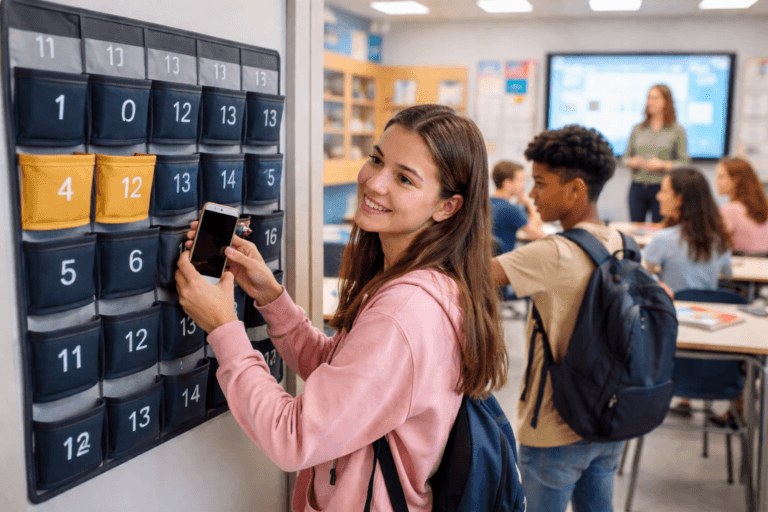
Put a school-issued laptop next to a student’s personal phone. Both devices can reach the internet, but they may operate under very different protections. A district can configure the laptop so filtering remains active when the student takes it home. A personal phone using cellular service can bypass the school network entirely.
That difference matters as the Federal Communications Commission reviews the future of E-Rate. The program is best known for helping schools and libraries afford internet access and network infrastructure. It also carries responsibilities under the Children’s Internet Protection Act, commonly known as CIPA.
Understanding those responsibilities can help school leaders explain what filtering does, where its protections end, and why internet safety cannot be handed over to one piece of software.
The Federal Baseline
Schools and libraries receiving E-Rate discounts for internet access or internal connections must comply with CIPA. They must adopt an internet safety policy and use technology protection measures to block or filter online images that are obscene, depict child pornography, or are harmful to minors when computers are used by minors.
Those requirements establish a federal baseline. They do not create a national list of every website a school must allow or block.
District leaders and school boards still make many of the practical decisions. They may apply different settings by grade level, restrict categories beyond the federal minimum, establish a process for teachers to request access to blocked resources, or determine when a filter may be disabled for lawful adult use.
Those choices should reflect instructional needs, student age, and community expectations. They also need regular review. An old setting may block a useful academic resource, while a new platform may expose a gap that did not exist when the policy was written.
Why Managed Devices Offer More Protection
CoSN’s CIRCUITS brief, Closing the Digital Safety Gap: E-Rate and the Evolution of School Filtering, draws an important distinction between school-managed technology and personal devices.
Districts can configure school-issued devices and accounts so their protections follow students beyond the school building. Depending on the district’s systems and policies, filtering can remain active when a student connects from home, a public location, or another network. Administrators can apply consistent rules, update settings, and review alerts across the devices they manage.
Personal devices are different. A phone connected to a cellular network does not pass through the school’s internet connection. Even while sitting in a classroom, a student may be able to reach content that is blocked on the school network. A personally owned laptop or tablet may also lack district-managed protections when it is used away from school.
Schools can filter traffic when personal devices connect to district Wi-Fi, but they cannot extend that control to a student’s private cellular service. Families and school communities need to understand that distinction. A blocked site opening on a personal phone does not necessarily mean the school filter failed; the device may never have used the filtered network.
How Filtering Has Changed
Older filters relied heavily on lists of websites placed into approved or blocked categories. Those lists still play a role, but modern systems can consider far more information.
Current tools may evaluate page content, patterns, user behavior, newly registered domains, and other signals. Machine learning can help identify potentially harmful material before a website has been manually categorized, and providers can update protections quickly as new threats appear.
None of that makes a filter perfect. Students may still use proxies, virtual private networks, personal hotspots, or other workarounds. Districts need reporting processes that identify repeated attempts and a clear plan for responding. Sometimes the right response is technical. Other cases call for a conversation with the student, communication with a family, or a review of school expectations.
What a Filter Cannot Do
A filter can restrict access to content that meets the district’s blocking criteria. It cannot supervise every interaction, prevent cyberbullying, judge the credibility of a source, or teach a student how to make a responsible choice. It also cannot protect a personal phone using cellular service.
Technical protections need support from:
- Clear acceptable-use expectations for students and staff
- Age-appropriate digital citizenship instruction
- Staff training on warning signs, reporting, and escalation
- Family communication about school-managed and personal technology
- A timely process for reviewing blocked sites and correcting overblocking
- A defined response when students repeatedly bypass safeguards
The goal is not to block as much of the internet as possible. Overblocking can interfere with research, accessibility, health information, and legitimate instruction. Underblocking can expose students to material that has no place in a school setting. Districts must keep working between those two risks.
Questions School Leaders Should Ask
Filtering decisions should not rest entirely with the technology department. Technology leaders understand the system, but educators, administrators, families, and students experience the results.
A district review should ask:
- Do protections follow school-issued devices when they leave the building?
- Are settings appropriate for different grade levels and instructional needs?
- Who reviews alerts, and what requires an immediate response?
- Can educators quickly request access when a legitimate resource is blocked?
- Does the district test for both underblocking and overblocking?
- Do families and students understand where the school’s protections apply and why they exist?
Why This Conversation Matters Now
In its current rulemaking, the FCC is considering whether its interpretation of CIPA remains the best reading of the law and whether existing protections are sufficient. That review is taking place alongside broader questions about E-Rate, including whether the program should be narrowed, restructured, or potentially ended.
School leaders can help the FCC understand how connectivity and safety work together at the local level. Their comments can explain how E-Rate-supported networks help districts apply protections consistently, what filtering can and cannot accomplish, and why decisions about instructional technology must reflect local needs.
Initial comments are due October 13, 2026. Reply comments are due November 12, 2026.
Take Action
- Visit the Save Our E-Rate campaign
- Contact elected officials through CoSN’s Action Center
- Submit comments through the FCC
For a companion discussion, listen to the CoSN Podcast episode Closing the Digital Safety Gap: E-Rate and the Evolution of School Filtering, produced and distributed in partnership with edCircuit.
School filtering works best when no one mistakes it for a complete solution. It is an important layer of protection tied to the requirements for receiving certain E-Rate discounts and shaped by local decisions. Its value depends on thoughtful settings, regular review, clear expectations, and adults who help students make safe choices online.
Subscribe to edCircuit to stay up to date on all of our shows, podcasts, news, and thought leadership articles.
Related reading
More on Education Policy and Government